What is Make.com and How to Use It.
Make.com is a visual, drag-and-drop automation platform for building complex app workflows without coding. Using a flexible, mind-map canvas, users can easily route data through multiple paths. The platform upgrades introduce native AI Agents, an in-canvas testing sandbox, and multi-modal file processing. This allows anyone to build smart, autonomous workflows (like invoice processors) without a developer budget.
The world of automation has officially outgrown the rigid, linear workflows of the past. Today, managing a modern business requires flexibility, speed, and the ability to process complex data on the fly. Enter Make.com, a visual, drag-and-drop automation platform that allows you to connect thousands of apps, like Gmail, Slack, Shopify, and OpenAI, without writing a single line of code.
Unlike older platforms that force you into a strict vertical list, Make utilizes a beautiful, 360-degree canvas that functions like a living mind map. With the integration of cutting-edge artificial intelligence, Make has evolved from a simple data-routing tool into a powerhouse for autonomous operations. Here is how Make.com works, why it is outperforming the competition, and how you can leverage it today.
1. The Core Mechanics of Make
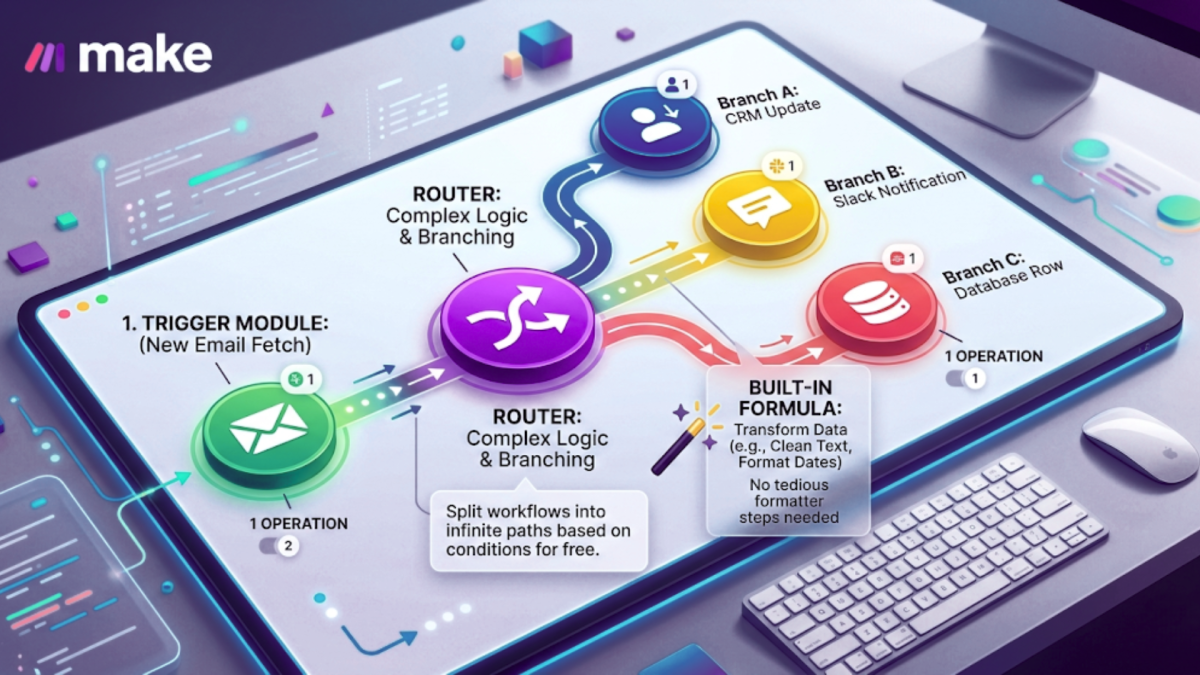
To understand Make, you have to understand its terminology and its unique visual approach to building workflows. Instead of looking at a text-heavy list, you build Scenarios on an open digital canvas. A scenario is the total end-to-end workflow you create.
Within this canvas, you drag and drop Modules, which are represented as individual app circles. Every time one of these circles performs an action, like fetching an email or updating a database, it counts as one Operation.
What truly sets Make apart from traditional tools like Zapier is its innate ability to handle complex logic through built-in Routers. If you want a single trigger to split into five different outcomes based on various conditions, you don't need an expensive enterprise plan; you simply click to add a router and branch your data out into infinite paths. Furthermore, Make includes powerful, built-in formulas that allow you to clean and transform text or numbers for free, eliminating the need for tedious "formatter" steps.
2. The Native "AI Agent" Module
The biggest game-changer for Make in 2026 is the introduction of the native "Run an Agent" module. Traditional automation relies on strict, unwavering rules: "If X happens, always do Y." The AI Agent module introduces "thinking" automation to your canvas.
Now, you can drop an AI Agent into your workflow, give it a high-level goal (Review this customer invoice and decide if the pricing looks fraudulent based on past records), and let the AI dynamically decide which path to take.
To make this even more powerful, Make features an In-Canvas Chat Sandbox. Instead of guessing how your AI will perform, you can chat directly with your AI agent inside the builder to test, refine, and fix its behavior before launching the automation. Combined with Multi-Modal Support, meaning the AI modules can natively read and process PDFs, images, and CSVs without requiring external plugins, Make has effectively democratized advanced AI operations for everyone.

3. Step-by-Step: Building Your First Autonomous Workflow
Getting started with Make is incredibly intuitive. Here is a foolproof guide to setting up your very first scenario:
-
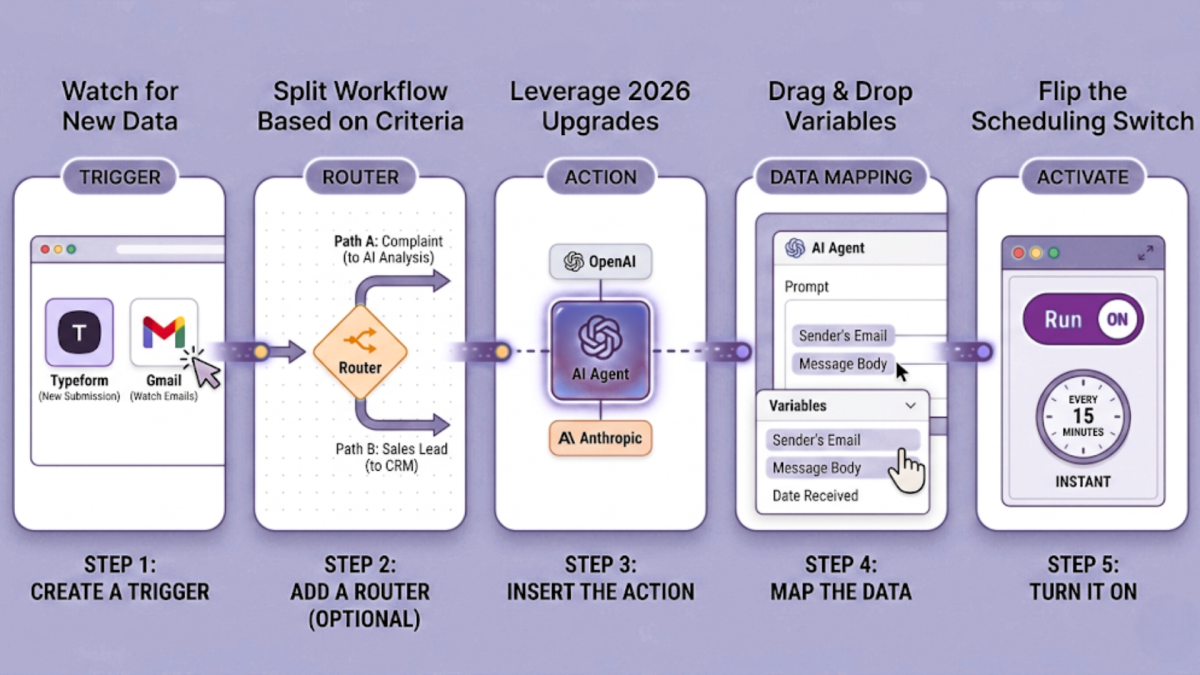
Step 1: Create a Trigger: Every scenario needs a starting point. Choose a module to watch for new data, such as Typeform (New Submission) or Gmail (Watch Emails).
-
Step 2: Add a Router (Optional): If you want to split your workflow based on specific criteria (If the email is a complaint, go to Path A, if it's a sales lead, go to Path B), click the canvas to add a Router.
-
Step 3: Insert the Action: Connect your next module. To leverage the 2026 upgrades, choose an AI Agent, OpenAI, or Anthropic module to analyze text, summarize data, or draft a reply.
-
Step 4: Map the Data: Click on any empty field in a module. Make will display a clean dropdown of variables from your previous steps. Simply drag and drop those variables (like Sender's Email or Message Body) into place.
-
Step 5: Turn It On: Flip the scheduling switch. You can set your scenario to run instantly as data arrives, every 15 minutes, or on a specific daily schedule.
Conclusion: The Future of Frictionless Work
Make.com has redefined what it means to build a modern digital workspace. By combining a highly visual, mind-map style canvas with powerful native AI agents, it has bridged the gap between complex software engineering and intuitive user design. Whether you are building an Autonomous Invoice Processor that automatically extracts data from emails into Google Sheets, or a Social Media Repurposer that turns a single video link into a week's worth of cross-platform content, Make handles the heavy lifting. In 2026, you no longer need a massive development budget to build a smarter business, you just need to map it out on Make.