
How to Use Suno AI: A Simple Guide to Making Great Music
Suno is an AI music tool that turns text prompts and custom lyrics into complete songs without needing any musical skills. By using Custom Mode, structured style descriptions, arrangement tags like [Chorus], and simple vocal-formatting tricks, you can guide the AI to produce polished, natural-sounding tracks piece by piece.
Suno is an AI tool that turns simple text ideas into complete songs, with real-sounding vocals, instruments, and beats. You do not need to play an instrument or know how to read music to use it. This guide explains how Suno works and shares easy tips to help you make songs that actually sound great.
What Suno Is and How It Works
Think of Suno as a virtual band and singer living inside your browser. You tell it what kind of song you want, and it writes and records the whole track in seconds.
You can use Suno in two main ways:
-
Simple Mode: Great for beginners. You just type a short idea, like "an upbeat 80s pop song about a road trip", and Suno writes the lyrics, creates the music, and gives you two versions to choose from.
-
Custom Mode: Best when you want more control. You can paste in your own lyrics, choose the exact music style, and even upload a short recording of yourself humming or playing guitar for Suno to turn into a full song.

How to Write Better Prompts
If you type something basic like "a sad rock song," Suno will give you a very average, predictable track. Giving clear details helps the AI understand the exact sound you want.
-
Follow a Simple Recipe: List your details in this order: Genre + Instruments + Mood + Speed. For example: "Acoustic folk, gentle guitar, warm cello, soft male voice, relaxing, slow tempo."
-
Label Your Song Parts: In Custom Mode, use square brackets like [Verse], [Chorus], and [Bridge] above your lyrics. This tells Suno when to build up the energy and when to keep things calm. You can even add extra hints inside the brackets, like [Chorus - loud drums and energetic singing].
-
Adjust the Creativity Sliders: If you use Suno's advanced sliders, try setting Weirdness around 60% and Style Influence around 75%. This keeps the song creative without sounding messy or robotic.

Easy Tricks for Better Vocals and Flow
Once you know the basics, a few simple typing tricks inside your lyrics box will make the AI singer sound much more human.
-
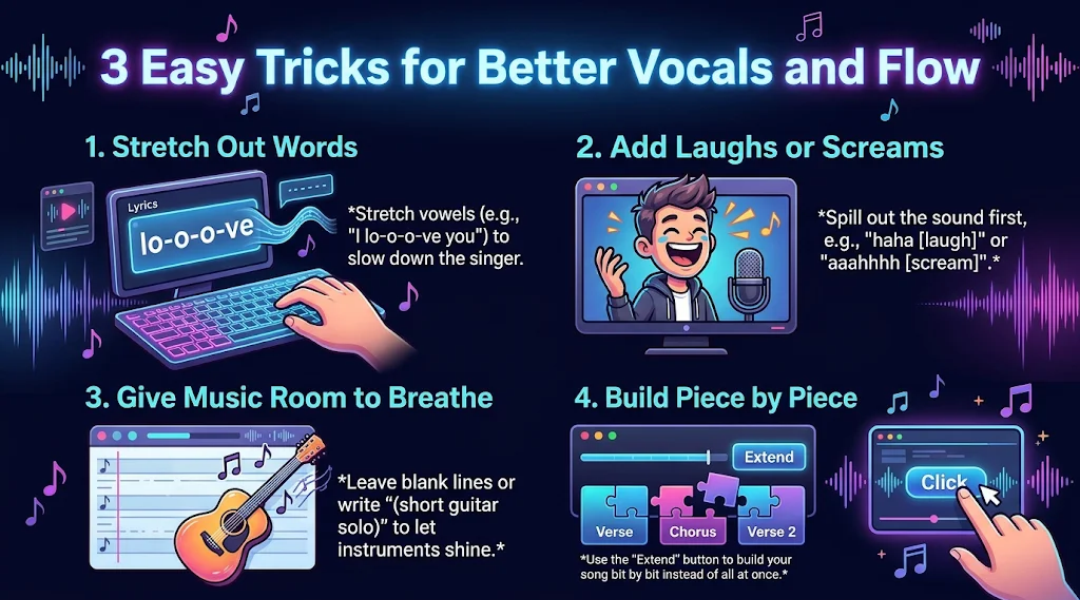
Stretch Out Words: If the singer rushes through a word, stretch the vowels using dashes, for example, write "I lo-o-o-ve you" instead of "I love you." Stick to three or four dashes so the voice stays smooth.
-
Add Laughs or Screams: Typing [laugh] by itself often gets ignored. Instead, spell out the sound right before the tag, like "haha [laugh]" or "aaahhh [scream]," so the AI knows how to perform it.
-
Give the Music Room to Breathe: Songs packed with non-stop singing can feel exhausting. Leave blank lines between your verse and chorus, or type (short guitar solo) on its own line so the instruments get a chance to shine.
-
Build Your Song Piece by Piece: Instead of making a three-minute song all at once, generate a great first verse and chorus. Then, click the Extend button to add the next verse and ending bit by bit.
Conclusion: Start Creating Your Own Tracks
The secret to using Suno well is treating it like a creative partner rather than a one-click vending machine. By combining clear music descriptions, simple song labels, and easy vocal tricks, you can guide the AI to match the exact sound in your head. Start with a clear idea, test a few versions, and use the extend feature to turn your favorite clips into finished songs.